Short Tips on 3 Website Map Templates Most Used
In the fast-paced digital world of 2025, a Website Map isn’t just a technical asset—it’s the foundation of your website’s visibility and usability. A well-crafted map defines how search engines crawl your pages and how visitors navigate them. Think of it as your site’s “blueprint,” ensuring every piece of content is discoverable and logically placed.
As explained in The reason behind having a sitemap before building your website, planning your site map before launching a website saves time, improves SEO, and eliminates dead ends that harm user experience.
Today, we’ll explore the three most-used Website Map templates—each with short, actionable tips for when and how to use them effectively. You’ll learn how these templates streamline design, help with crawling, and ensure your visitors always find what they’re looking for.
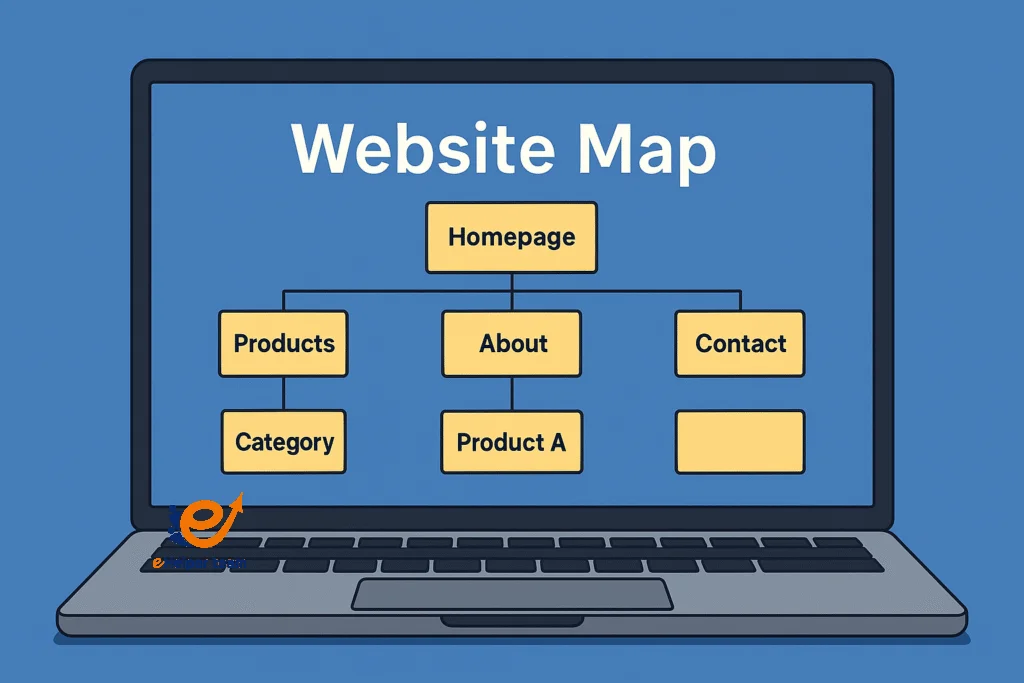


Understanding the Role of a Website Map in SEO and User Experience
Before diving into templates, it’s crucial to understand what a Website Map does and why it remains a cornerstone of web development.
The Dual Function of a Website Map
A Website Map serves both users and search engines:
For users, it simplifies navigation, allowing them to locate content quickly.
For search engines, it acts as a guide to crawl and index every important page efficiently.
Search engines like Google depend heavily on your sitemap to understand your site’s hierarchy. Without it, your site might remain partially invisible to crawlers, no matter how good your content is.
The Link Between Structure and Ranking
A clean Website Map supports structured internal linking, which distributes “link equity” more evenly across pages. According to experts, sites with logical architecture see better engagement metrics—lower bounce rates, longer sessions, and higher conversion potential.
You can learn more about the technical side from the Sitemap function, And How do create a sitemap for your site, which offers a great breakdown of sitemap creation.
Common Mistakes in Website Mapping
Even professional developers make simple errors:
Overcrowding pages without categories
Forgetting to update the sitemap after redesigns
Neglecting image or video sitemaps for multimedia-heavy sites
Avoiding these pitfalls ensures your site stays search-engine friendly and user-oriented.
Short Tips on 3 Website Map Templates Most Used
Template 1 – Hierarchical Website Map (The Classic Structure)
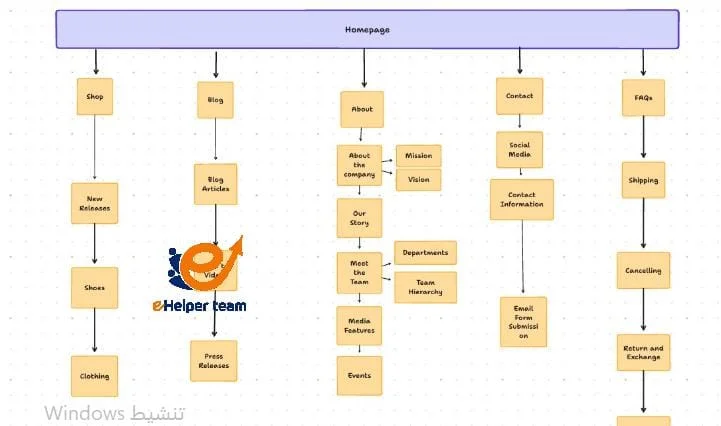
The hierarchical Website Map remains the most popular model across industries in 2025. It’s a tree-like structure that starts with the homepage at the top and branches down into subpages and categories.
How It Works
The homepage serves as the root.
Categories (such as Products, Services, About, Blog) branch out beneath.
Each category expands further into related subpages.
This model mirrors how most users think—starting broad, then narrowing down. It also aligns perfectly with Google’s site indexing logic.
When to Use This Template
Use a hierarchical Website Map when:
Your site has multiple product categories or service areas.
You want a clear, top-down navigation system.
Your audience prefers traditional browsing structures.
Pro Tips for Optimization
Limit each category to 7 subpages for readability.
Add breadcrumb navigation for better user orientation.
Update your sitemap.xml after every structural change.
Test navigation flow using Google’s “Crawl Stats” report in Search Console.
This structure is particularly effective for e-commerce and corporate websites.
Template 2 – Flat Website Map (For Minimalist or Single-Service Sites)
The flat Website Map template is gaining traction among minimalist brands and single-service businesses. Unlike hierarchical maps, flat maps minimize the number of clicks needed to reach any page—usually just one or two.
Why Flat Maps Are Trending
Speed and simplicity are everything in 2025. A flat Website Map boosts accessibility and is ideal for startups, personal portfolios, or product landing pages.
Benefits of Flat Website Maps
Better mobile experience: Perfect for responsive sites where screen real estate is limited.
Easier maintenance: With fewer levels, editing or restructuring becomes straightforward.
Improved crawl depth: Search engines reach all key pages equally fast.
Optimization Tips
Keep URLs concise and keyword-rich.
Avoid orphan pages by linking each page at least once.
Use footer menus to reinforce flat navigation structure.
Pair with schema markup to help crawlers identify your hierarchy even in a flat system.
This format fits modern digital agencies, landing page portfolios, and product-focused startups.
Template 3 – Hybrid Website Map (The Modern Compromise)
The hybrid Website Map blends hierarchical and flat structures for maximum flexibility. It’s particularly useful for larger sites that want to maintain both breadth and simplicity.
How It Combines the Best of Both Worlds
A hybrid design uses a broad top-level structure like a flat map but adds logical subcategories for scalability. For example:
Home → Solutions → Industries → Case Studies
Home → Blog → Topics → Individual Posts
This provides clean, navigable pathways without overwhelming users or crawlers.
Best Practices for Hybrid Website Maps
Keep no more than three hierarchical levels to avoid confusion.
Ensure consistent internal linking between sections.
Use XML and HTML sitemaps together—one for crawlers, one for users.
Employ automated sitemap generators to maintain consistency.
Who Should Use It
Hybrid maps are ideal for:
News portals
SaaS platforms
Educational websites
Multi-service companies
These sites require flexible categorization but still need a clear, intuitive layout.
Optimizing Your Website Map for Google Indexing
Creating a Website Map is only the beginning; true success comes from optimizing it for Google’s crawling and indexing algorithms. If your sitemap isn’t correctly structured, you risk having valuable pages go unnoticed by search engines.
Ensure Correct XML Formatting
An XML sitemap is the technical file that Googlebot reads first. To make it effective:
Use UTF-8 encoding.
Limit each sitemap file to 50,000 URLs or less than 50MB.
Always include <lastmod> tags to show update frequency.
Keep it clean—no broken links or redirected URLs.
Google recommends submitting your sitemap through Google Search Console for faster indexing. This allows the crawler to understand your site’s layout directly from your Website Map.
Prioritize Important Pages
Not every page deserves to be indexed. Prioritize:
- Core service pages
- Key landing pages
- Blog categories
- Product hubs
- Leave out thin or duplicate content. A focused sitemap ensures that your site’s ranking
- Power goes to your best-performing pages.
Use Both XML and HTML Sitemaps
While XML helps search engines, HTML helps users. HTML maps give human visitors a bird’s-eye view of your website structure. Combine both versions to maximize accessibility and SEO.
Testing and Validation
Use tools like:
Google Search Console → Sitemap report
Screaming Frog SEO Spider
XML Sitemap Validator
These ensure there are no crawl errors or unindexed URLs, keeping your site fully visible online.
Website Map Tools and Generators (2025 Update)
Today, web developers have access to dozens of advanced tools for building and maintaining their sitemaps. These platforms simplify the process and help you update your Website Map dynamically as your content evolves.
Recommended Sitemap Generators
Here are a few of the best tools for 2025:
Yoast SEO (WordPress Plugin) – Automatically generates XML sitemaps and updates them when new content is added.
Slickplan – A visual sitemap planner with drag-and-drop features. Perfect for designers and teams.
Dynomapper – Integrates with Google Analytics and tracks content performance by sitemap section.
VisualSitemaps.com – Creates visual snapshots of your site’s architecture.
GlooMaps – Simple, browser-based visual tool for planning site structures.
How AI Tools Improve Mapping
AI-powered tools now analyze user behavior to recommend better navigation flows. They track which pages users visit most and suggest restructuring your Website Map to improve conversion paths. Some even auto-generate new sections when they detect content clusters.
Common Errors and How to Fix Them
Even experienced developers can make simple but costly mistakes when managing a Website Map. Let’s review the top ones and how to resolve them efficiently.
1. Forgetting to Update the Sitemap
When new content is added or old pages are removed, failing to update your sitemap confuses both users and search engines.
Fix: Automate sitemap updates using plugins or schedule monthly audits.
2. Duplicated or Orphaned Pages
Duplicate entries waste crawl budget, while orphaned pages (no internal links) can’t be reached.
Fix: Conduct link audits and ensure every page has at least one internal reference.
3. Exceeding Sitemap Limits
Google limits each sitemap file to 50MB or 50,000 URLs. Oversized maps may not load correctly.
Fix: Split large sites into multiple sitemaps (e.g., products, blogs, services) and create an index sitemap.
4. Incorrect Canonical URLs
When canonical tags don’t match sitemap URLs, indexing errors occur.
Fix: Ensure the sitemap always lists canonical, final URLs only.
5. Ignoring Image or Video Sitemaps
Modern websites use visual content extensively. Missing media sitemaps means search engines can’t properly index them.
Fix: Add image and video sitemaps for full coverage.
Frequently Asked Questions (FAQs)
Q1: What is a Website Map in simple terms?
A Website Map is a structured list or visual representation of your site’s pages. It helps search engines and visitors navigate your website easily.
Q2: What’s the difference between XML and HTML sitemaps?
XML sitemaps target search engines; HTML sitemaps are made for users. Having both ensures complete accessibility.
Q3: How often should I update my Website Map?
At least once a month—or every time you add, remove, or modify content pages.
Q4: Do all websites need a sitemap?
Yes. Even small sites benefit from one because it improves indexing and enhances SEO performance.
Q5: Can I submit multiple sitemaps to Google?
Absolutely. Large websites can use multiple sitemaps for better organization (e.g., one for blogs, one for products).
Q6: What’s the ideal number of levels in a Website Map?
Three levels are generally ideal. Anything deeper makes navigation and crawling harder.
Q7: What tools can help me create a sitemap easily?
Yoast SEO, GlooMaps, Slickplan, and Dynomapper are top-rated for 2025.
Q8: How does a Website Map improve SEO?
It allows search engines to crawl all important pages, improving visibility, ranking potential, and user satisfaction.
Q9: What are orphan pages, and how do I find them?
Orphan pages have no internal links. Tools like Screaming Frog or Ahrefs can help you detect and fix them.
Q10: Can broken links in a sitemap harm SEO?
Yes. Broken links waste crawl budget and reduce trustworthiness. Always validate your sitemap before submission.
Conclusion
A Website Map is more than a technical file—it’s your site’s living architecture. The right template (hierarchical, flat, or hybrid) directly impacts how well users interact with your content and how search engines rank it.
By combining smart design, automation tools, and regular updates, you ensure your website remains crawlable, user-friendly, and aligned with the latest SEO standards.
Remember: a clean, accurate Website Map reflects a well-managed digital presence. Whether you’re launching a small business site or managing a large platform, invest in mapping first—it’s the quiet hero behind every successful website.